About Product Parameters
Specific parameters are required or useful to set up the products that will be published in the Kitchen Planner.
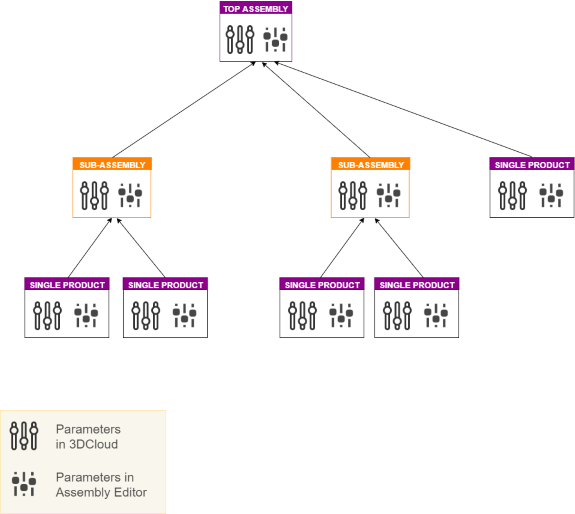
❗ 3DCloud and Assembly Editor both use these parameters, which means that every parameter defined in 3DCloud must be defined in Assembly Editor, and conversely.
Parameters go up from the base to the top. This means that, in addition to its own parameters, the top-assembly refers to the parameters of each sub-assembly and to the parameters of each single product it is made of.
These parameters include size parameters and mandatory or optional option parameters.
About Size Parameters
❗ Size parameters must be defined systematically, for every product.
-
If the product is a cabinet, a worktop, a door front, a drawer front, a handle, a leg, a shelf then, the size parameters are
width,depthandheight. -
If the product is a wall panel, the size parameters are
width,thicknessandheight. -
In the specific case of an operation (i.e. various types of cut for a worktop or a wall panel), the size parameters are
width,depth,lengthandradius.
Type of Parameters
The parameters have one of the following types:
| Type | Purpose |
|---|---|
| boolean | To enable a product or a behavior. |
| real | To specify a size. |
| integer | To specify an option. |
| product | To specify a component of an assembly. |
| string | To add a description. |
| material | To specify a material ID. |