Automatic Symbols for appliances

SymbolsMappingRule
Notification level: Not applicable
| Key | Value |
|---|---|
| ID | SymbolsMappingRule |
| Translation key | / |
Behavior
This business rule is only available through the Kitchen Expert Suite offer.
The objective of this rule is to add automatically symbols in the 2D Plans when the appliances or sanitaries products are added in the project. The setup of the symbols has to be set directly in the overload parameters of the business rule.
Example: The retailers want to add a electric plug with a specific amperage (i.e 16 A) automatically for a dishwasher. It avoids the addition of this technical element in the installation plans manually and increase the productivity.
Trigger Conditions
This business rule is triggered when the user adds any product in the scene and if one or several symbols are attached to this type of cabinet in the overload parameters of this business rule. When the user goes to Medias layer or to Installation Plans and displays the 2D Plans, the symbols are automatically attached to this product.
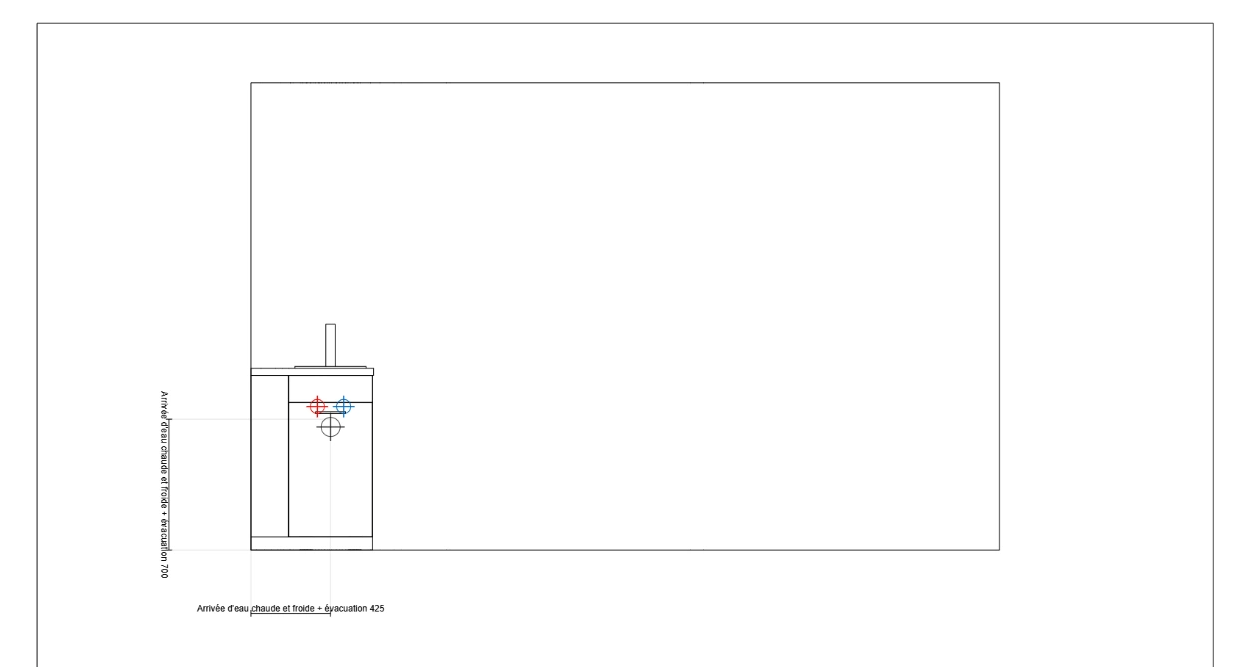
Overload Parameter
The overload is formatted as a JSON object, in which each property is a rule that defines the mapping between the parameters.
| Key name | Type | Default value | Description |
|---|---|---|---|
closedTagID | object | – | Mandatory Object containing the different parameters of the symbol with the key for reference as a closedTagID. (example: 235 = Dishwashers) |
symbolIds | array | – | Mandatory. Define the list of the symbols attached to this type of product. It can be one or several symbols. The value is the ID of the product symbol. |
onePerProduct | boolean | – | Optionnal Define if there is only one symbol per product. |
position | object | – | Optionnal type Define the position of the symbol. The possible values are "left", "right", "center", "top", "bottom" and "leftOrRight". offset Define the position of the symbol relative to the center of the product. |
Note that there are several options if the range maintainer defines leftOrRight value for type parameter in the position object.
| Key name | Type | Default value | Description |
|---|---|---|---|
referenceTypes | array | – | Optionnal Array of closedTagIDs which refers to sub-products of the cabinet. (example for sinks, double sinks) |
onLargestPartOfWall | boolean | – | Optionnal Define if the symbol takes a largest part of the wall. |
Symbol declaration in the product for specialization
If some products require some symbol specialization, the range maintainer can configure their own symbols on the product in the 2D Plans. Indeed, the dedicated parameters need to be declared in the product directly such as for dishwashers, refrigerators, etc.
Example:

📌 Note that the range maintainer needs to declare the possible values by adding the wanted symbols product to display it in the 2D Plans.
{
  "37": {
    "symbolIds": [
      "LIBRARY_SYMBOL_ELEC_PLUMB_8"
    ],
    "onePerProduct": true
  },
  "42": {
    "symbolIds": [
      "LIBRARY_SYMBOL_ELEC_PLUMB_8"
    ],
    "onePerProduct": true
  },
  "47": {
    "symbolIds": [
      "LIBRARY_SYMBOL_ELEC_PLUMB_8"
    ],
    "onePerProduct": true
  },
  "94": {
    "symbolIds": [
      "LIBRARY_SYMBOL_ELEC_PLUMB_3"
    ],
    "onePerProduct": true
  },
  "154": {
    "symbolIds": [
      "LIBRARY_SYMBOL_ELEC_PLUMB_1"
    ],
    "onePerProduct": true
  },
  "160": {
    "symbolIds": [
      "LIBRARY_SYMBOL_ELEC_PLUMB_4"
    ],
    "onePerProduct": true,
    "position": {
      "type": "center",
    }
  },
  "188": {
    "symbolIds": [
      "LIBRARY_SYMBOL_ELEC_PLUMB_11"
    ],
    "onePerProduct": true,
    "position": {
      "type": "leftOrRight",
      "offset": 150,
      "onLargestPartOfWall": true
    }
  },
  "234": {
    "symbolIds": [
      "LIBRARY_SYMBOL_ELEC_PLUMB_2"
    ],
    "onePerProduct": true,
    "position": {
      "type": "bottom",
      "offset": 50
    }
  },
  "235": {
    "symbolIds": [
      "LIBRARY_SYMBOL_ELEC_PLUMB_9"
    ],
    "onePerProduct": true,
    "position": {
      "type": "leftOrRight",
      "offset": 150,
      "referenceTypes": [
        37,
        42,
        47
      ]
    }
  },
  "761": {
    "symbolIds": [
      "LIBRARY_SYMBOL_ELEC_PLUMB_11"
    ],
    "onePerProduct": true,
    "position": {
      "type": "leftOrRight",
      "offset": 150,
      "onLargestPartOfWall": true
    }
  },
  "762": {
    "symbolIds": [
      "LIBRARY_SYMBOL_ELEC_PLUMB_11"
    ],
    "onePerProduct": true,
    "position": {
      "type": "leftOrRight",
      "offset": 150,
      "onLargestPartOfWall": true
    }
  },
  "763": {
    "symbolIds": [
      "LIBRARY_SYMBOL_ELEC_PLUMB_1"
    ],
    "onePerProduct": true
  },
  "764": {
    "symbolIds": [
      "LIBRARY_SYMBOL_ELEC_PLUMB_1"
    ],
    "onePerProduct": true
  },
  "765": {
    "symbolIds": [
      "LIBRARY_SYMBOL_ELEC_PLUMB_1"
    ],
    "onePerProduct": true
  }
}