Distance From Wall and Obstacle

MinDistanceFromWallAndObstacle
The minimum distance between an item and a wall or obstacle.
Notification level ⚠
| Key | Value |
|---|---|
| ID | MinDistanceFromWallAndObstacle |
| Translation key (sink cabinet) | sink_cabinet_rule_title cabinet_rule_error_message |
| Translation key (base cabinet) | base_cabinet_rule_title cabinet_rule_error_message |
| Translation key (wall cabinet) | wall_cabinet_rule_title cabinet_rule_error_message |
| Translation key (high cabinet) | high_cabinet_rule_title cabinet_rule_error_message |
| Translation key (half height cabinet) | half_height_cabinet_rule_title half_height_cabinet_rule_error_message |
| Translation key (dishwasher) | dishwasher_rule_title dishwasher_rule_error_message |
| Translation key (washer) | washer_rule_title washer_rule_error_message |
| Translation key (fridge) | fridge_rule_title fridge_rule_error_message |
Behavior
This rule checks if the distance between an item and a wall or an obstacle matches the minimum distance set in the application, in order to prevent the user from planning an invalid kitchen.
Trigger Conditions
It is triggered if the distance between an item and a wall or an obstacle is less than the chosen minimum distance, the rule is triggered and the application warns the user to modify the position of this cabinet.
Affected Products
The affected appliances are sink, dishwasher, washer, fridge, wall, high, half height and base cabinets, wall-mounted items with targetPosition set as "onWall".
If two affected products and obstacle or Wall are closer than the minimum value, the rule is triggered. If the front side of the cabinet is overlapped by the front side of the obstacle and the distance between them is closer than the minimum value.
The fridge product must have a closed tag "Refrigerators" as well as an option with an ID "layout" and for value "freeStanding".
This information is mandatory in order to have a check on freestanding fridges.
- The base cabinet product must have a closed tag
BaseCabinets. - The wall cabinet product must have a closed tag
WallCabinets. - The high cabinet product must have a closed tag
HighCabinets. - The half height cabinet product must have a closed tag
HalfHeightCabinets. - The washer product must have a closed tag
Washers. - The dishwasher product must have a closed tag
Dishwashers. - The sink product must have a closed tag
Sinks. - Wall mounted items with behaviour(targetPosition) set as
onWall.
This information is mandatory in order to have a check on the freestanding fridges.
For example
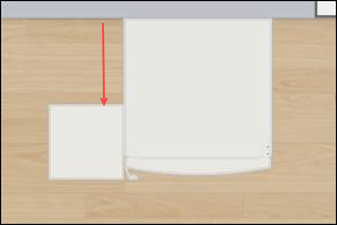
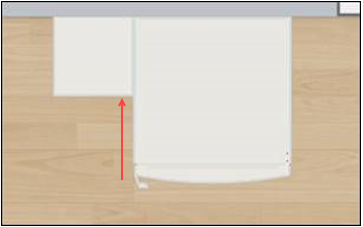
In the images below an obstacle (small element) and a freestanding fridge (large element) are placed in two different ways: in one case, the rule is triggerd, in the other it is not.
| Triggers the rule | Does NOT trigger the rule |
|---|---|
 |  |
Overload Parameter
| Key name | Type | Default value | Description |
|---|---|---|---|
minDistance | number | 50 | This parameter defines the necessary minimum distance between base/high/wall/half height cabinet / wall-mounted item and the wall/obstacle. Mandatory. |
minDistanceSink | number | 100 | This parameter defines the necessary minimum distance between sink cabinet and the wall/obstacle. Mandatory. |
minDistanceFridge | number | 150 | This parameter defines the necessary minimum distance between fridge and the wall/obstacle. Mandatory. |
distance | number | 50 | (Deprecated, use minDistance) This parameter defines the necessary minimum distance between base/high/wall/half height cabinet and the wall/obstacle. |
distanceSink | number | 100 | (Deprecated, use minDistanceSink) This parameter defines the necessary minimum distance between sink cabinet and the wall/obstacle. |
distanceFridge | number | 150 | (Deprecated, use minDistanceFridge) This parameter defines the necessary minimum distance between fridge and the wall/obstacle. |
Sample
{
   "minDistance":50
}
{
   "minDistanceSink":100
}
{
   "minDistanceFridge":150
}
Illustration
Case 1 – Check with sink cabinet
The distance between the sink cabinet and the wall is too small, the rule is triggered and informs the user to change the position of this cabinet. A notification is displayed to guide the user through the changes.
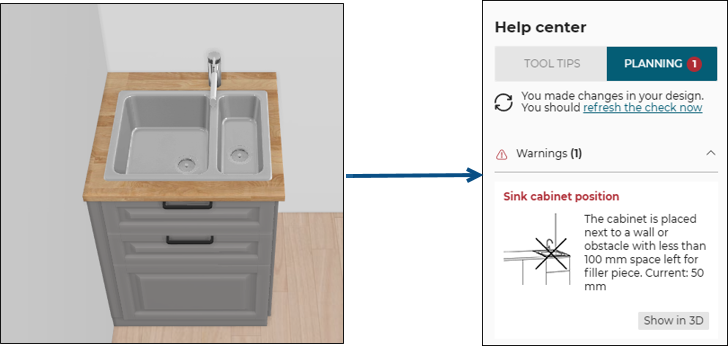
Once the user has moved the sink cabinet away from the wall to a distance of at least 100 mm (the overload value in this example).
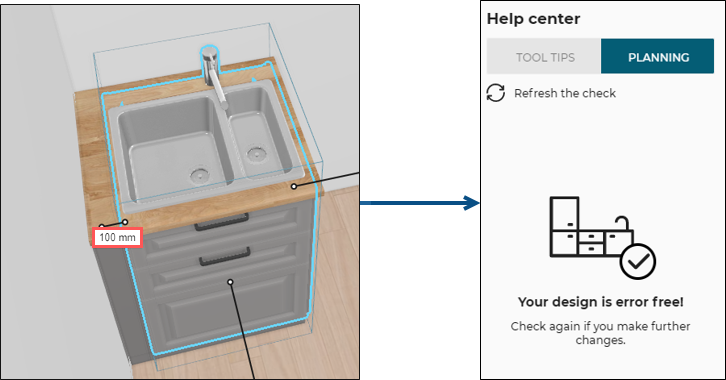
After clicking the Refresh the check on the Help center, the design is error free.
Case 2 – Check with base/wall/high/half height cabinet
The distance between the base cabinet and the wall is too small, the business rule is triggered and informs the user to change the position of this cabinet. An animation is displayed to guide the user through the changes.
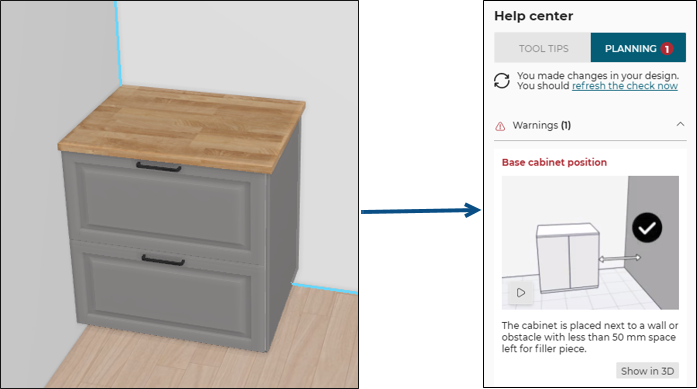
Once the user has moved the base cabinet away from the wall to a distance greater than or equal to 50 mm (the overloaded value in this example).
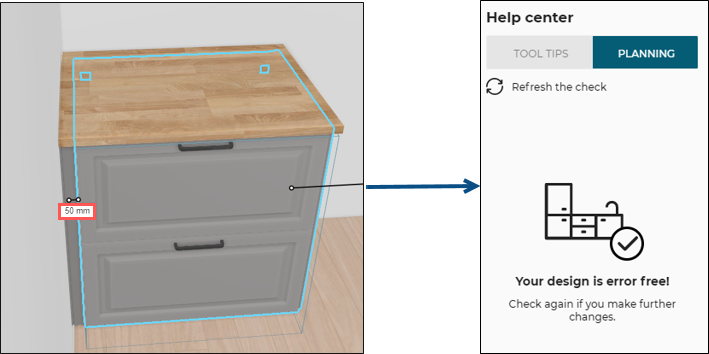
After clicking the Refresh the check on the Help center, the design is error free.
Case 3 – Check with freestanding fridge
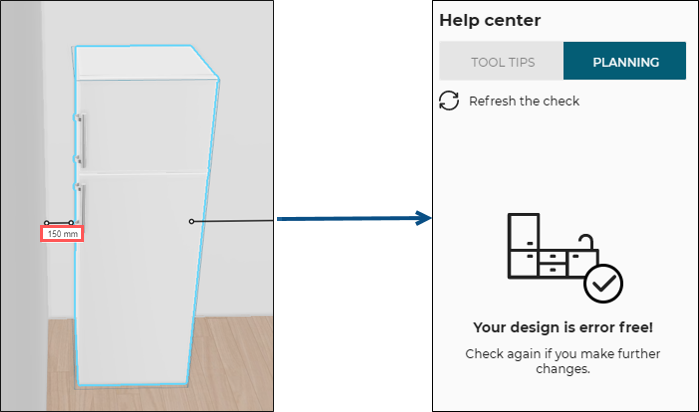
The distance between the freestanding fridge and the wall is too small, the business rule is triggered and informs the user to change the position of this appliance. An animation is displayed to guide the user through the changes.
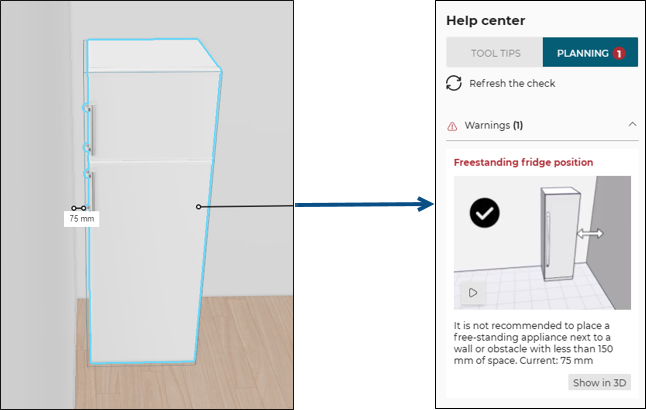
Once the user has moved the freestanding fridge away from the wall to a distance greater than or equal to 150 mm (the overload value in this example).
After clicking the Refresh the check on the Help center, the design is error free.
Case 4 – Check with wall mounted item
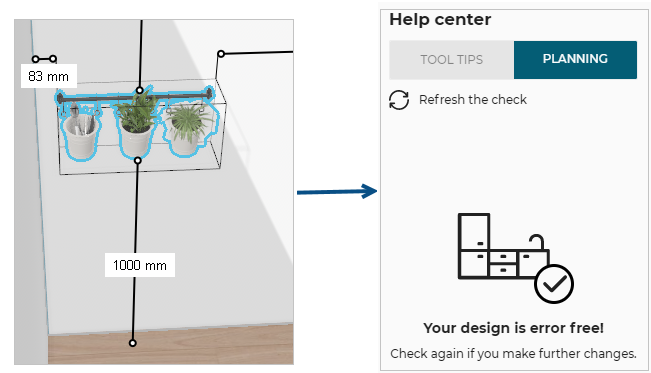
The distance between the wall-mounted item and the wall is too small, the business rule is triggered and informs the user to change the position of this item.
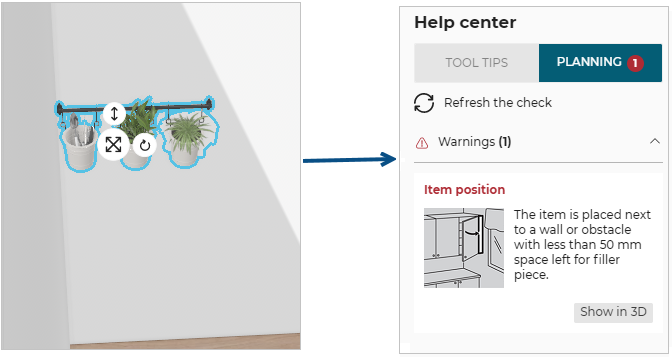
Once the user has moved the wall-mounted item away from the wall to a distance greater than or equal to 50 mm (the overload value in this example).
After clicking the Refresh the check on the Help center, the design is error free.