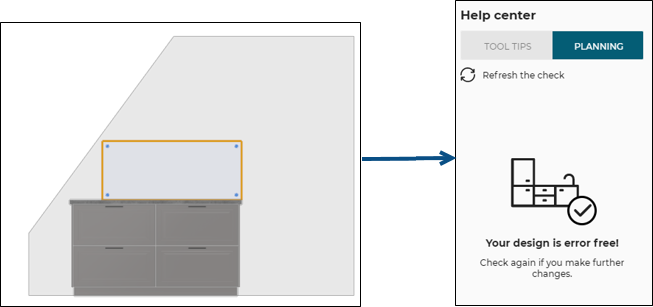
Intersection with Sloping Ceiling

IntersectionWithSlopedCeilingRule
Cabinet or wall panel intersecting with sloping ceiling.
Notification level: ⚠
| Key | Value |
|---|---|
| ID | IntersectionWithSlopedCeilingRule |
| Translation key (cabinet) | sloping_rule_intersection_title sloping_rule_intersection_message |
| Translation key (wall panel) | sloping_rule_wall_panel_intersection_title sloping_rule_wall_panel_intersection_message |
Behavior
This rule checks if a cabinet or a wall panel is intersecting/colliding with the sloping ceiling, in order to prevent the user from planning a dangerous kitchen.
Trigger Conditions
It is triggered if a cabinet (base, wall, high or half height) or a wall panel is intersecting/colliding with the sloping ceiling. The application warns to modify the position of the cabinet/wall panel.
Illustration
Case 1 – Check with base/wall/high/half height cabinet
The base cabinet is intersecting with the sloping ceiling, the rule is triggered and informs the user to change the position of the cabinet. An animation is displayed to guide the user through the changes.
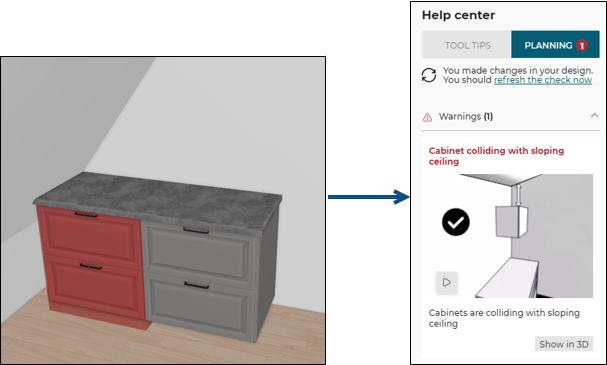
Once the cabinet has been moved, there is no collision, and the design becomes error free.
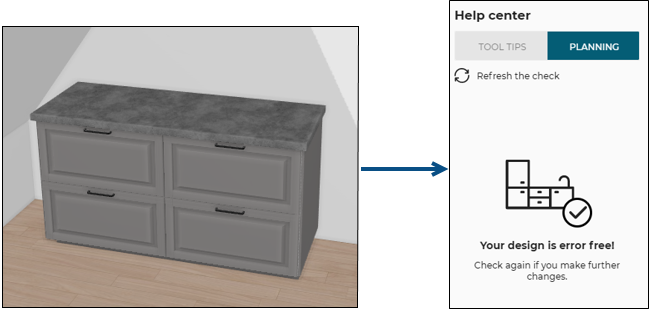
Case 2 – Check with wall panel
The wall panel is intersecting with the sloping ceiling, the rule is triggered and informs the user to change the position of this wall panel. An animation is displayed to guide the user through the changes.
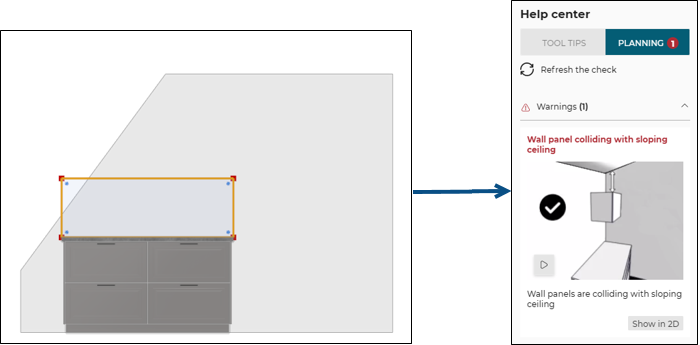
Once the cabinet has been moved, there is no collision, and the design becomes error free.