Distance Between Sloping Ceiling and Cabinets

MinDistanceSlopingCeilingAndCabinets
Distance between a cabinet and a sloping ceiling.
Notification level: ℹ
| Key | Value |
|---|---|
| ID | MinDistanceSlopingCeilingAndCabinets |
| Translation key (base cabinet) | sloping_rule_base_cabinet_title sloping_rule_base_cabinet_error_message |
| Translation key (high cabinet) | sloping_rule_high_cabinet_title sloping_rule_high_cabinet_error_message |
| Translation key (wall cabinet) | sloping_rule_wall_cabinet_title sloping_rule_wall_cabinet_error_message |
| Translation key (horizontal cabinet) | sloping_rule_horizontal_cabinet_title sloping_rule_horizontal_cabinet_error_message |
| Translation key (half height cabinet) | sloping_rule_half_height_cabinet_title sloping_rule_half_height_cabinet_error_message |
| Translation key (fridge) | sloping_rule_fridge_cabinet_title sloping_rule_fridge_cabinet_error_message |
| Translation key (sink) | sloping_rule_sink_cabinet_title sloping_rule_sink_cabinet_error_message |
| Translation key (cooktop) | sloping_rule_cooktop_cabinet_title sloping_rule_cooktop_cabinet_error_message |
| Translation key (wall panel)) | sloping_rule_wall_panel_title sloping_rule_wall_panel_error_message |
| Translation key (high cabinet with top light) | sloping_rule_high_cabinet_top_light_title sloping_rule_high_cabinet_top_light_error_message |
| Translation key (wall cabinet with top light) | sloping_rule_wall_cabinet_top_light_title sloping_rule_wall_cabinet_top_light_error_message |
| Translation key (horizontal cabinet with top light) | sloping_rule_horizontal_cabinet_top_light_title sloping_rule_horizontal_cabinet_top_light_error_message |
Behavior
This rule checks if the distance between a cabinet and the sloping ceiling is more than the chosen minimum distance, in order to prevent the user from creating a dangerous kitchen.
Trigger Conditions
It is triggered if the distance between a cabinet and the sloping ceiling is less than the chosen minimum distance, the rule is triggered and the application recommends to modify the position of the cabinet.
Affected Products
The following products are affected by the rule:
- The sinks with the closed tag
Sinks - The cooktops with the closed tag
Cooktops - The ovens with the closed tag
OvenCabinets - The base cabinets with the closed tag
BaseCabinets - The high cabinets with the closed tag
HighCabinets - The wall cabinets with the closed tag
WallCabinets - The half height cabinets with the closed tag
HalfHeightCabinets - The washers with the closed tag
Washers - The dishwashers with the closed tag
Dishwashers - The oven with the closed tag
Oven - The fridges with the closed tag
Refrigeratorsas well as an option with the IDlayoutand the value freeStanding.

This information is mandatory in order to have a check on the freestanding fridges.
Overload Parameter
The following list is the list of keys of the "minDistance" object (deprecated parameter "distance").
| Key name | Type | Default value | Description |
|---|---|---|---|
fridgeUnit | number | 90 | This parameter defines the necessary minimum distance between the fridge and the sloping ceiling. Mandatory. |
highUnit | number | 90 | This parameter defines the necessary minimum distance between the high cabinet and the sloping ceiling. Mandatory. |
wallUnit | number | 90 | This parameter defines the necessary minimum distance between the wall cabinet and the sloping ceiling. Mandatory. |
horizontalUnit | number | 200 | This parameter defines the necessary minimum distance between the horizontal cabinet and the sloping ceiling. Mandatory. |
baseUnit | number | 200 | This parameter defines the necessary minimum distance between the base cabinet and the sloping ceiling. Mandatory. |
sinkUnit | number | 100 | This parameter defines the necessary minimum distance between the sink and the sloping ceiling. Mandatory. |
cooktopUnit | number | 550 | This parameter defines the necessary minimum distance between the cooktop and the sloping ceiling. Mandatory. |
wallPanelUnit | number | 10 | This parameter defines the necessary minimum distance between the wall panel and the sloping ceiling. Mandatory. |
wallUnitWithTopLight | number | 90 | This parameter defines the necessary minimum distance between the wall cabinet with top light and the sloping ceiling. Mandatory. |
highUnitWithTopLight | number | 200 | This parameter defines the necessary minimum distance between the high cabinet with top light and the sloping ceiling. Mandatory. |
horizontalUnitWithTopLight | number | 200 | This parameter defines the necessary minimum distance between the horizontal cabinet with top light and the sloping ceiling. Mandatory. |
ovenUnit | number | 550 | This parameter defines the necessary minimum distance between the oven and the sloping ceiling. Mandatory. |
dishwasherUnit | number | 200 | This parameter defines the necessary minimum distance between the dishwasher and the sloping ceiling. Mandatory. |
washerUnit | number | 200 | This parameter defines the necessary minimum distance between the washer and the sloping ceiling. Mandatory. |
halfHeightUnit | number | 90 | This parameter defines the necessary minimum distance between the half height cabinet and the sloping ceiling. Mandatory. |
Sample
{
   "minDistance" :
   {
      "fridgeUnit":90,
      "highUnit":90,
      "wallUnit":90,
      "horizontalUnit":200,
      "baseUnit":200,
      "sinkUnit":100,
      "cooktopUnit":550,
      "wallPanelUnit":10,
      "wallUnitWithTopLight":90,
      "highUnitWithTopLight":90,
      "horizontalUnitWithTopLight":200,
      "ovenUnit":550,
      "dishwasherUnit":200,
      "washerUnit":200,
      "halfHeightUnit":90
   }
}
Illustration
Case 1 – Check with base cabinet
The distance between the base cabinet and the sloping ceiling is less than the minimum distance, the rule is triggered and informs the user to change the position of the cabinet.

Once the user has moved the cabinet away from the sloping ceiling to a distance greater than or equal to 200 mm (the overload value in this example).
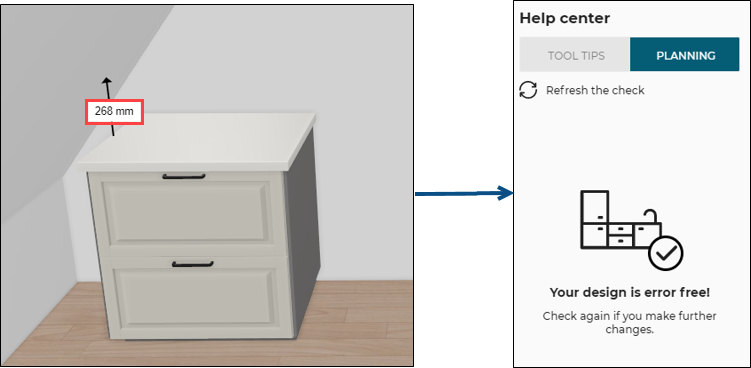
After clicking Refresh the check on the Help center, the design is now error free.
Case 2 – Check with high cabinet
The distance between the high cabinet and the sloping ceiling is less than the minimum distance, the rule is triggered and informs the user to change the position of the high cabinet.
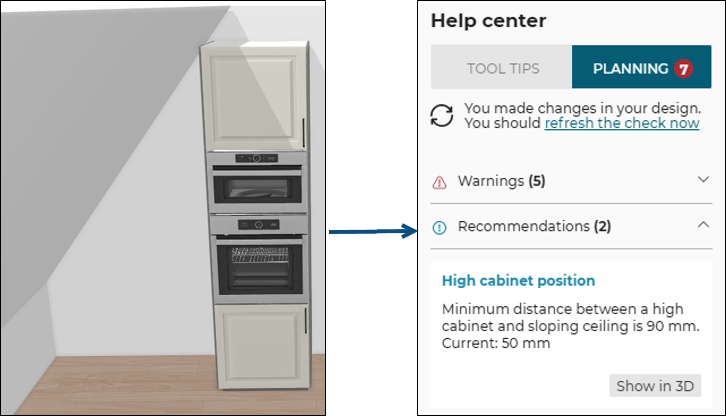
Once the user has moved the cabinet away from the sloping ceiling to a distance greater than or equal to 90 mm (the overload value in this example).
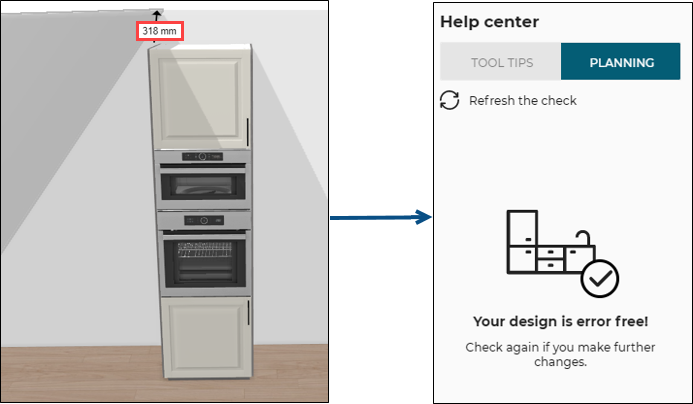
After clicking Refresh the check on the Help center, the design is now error free.
Case 3 – Check with wall cabinet
The distance between the wall cabinet and the sloping ceiling is less than the minimum distance, the rule is triggered and informs the user to change the position of the cabinet.

Once the user has moved the cabinet away from the sloping ceiling to a distance greater than or equal to 90 mm (the overload chosen value in this example).
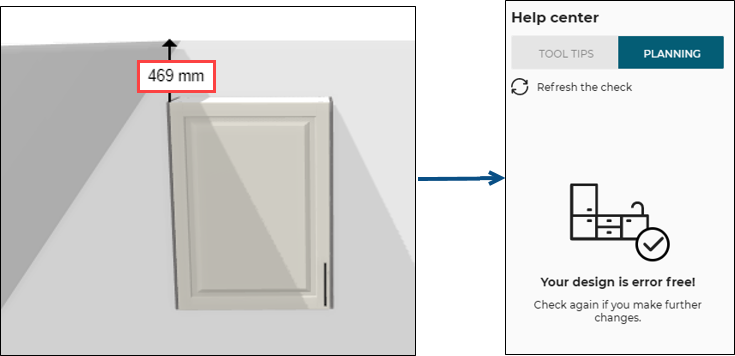
After clicking Refresh the check on the Help center, the design is now error free.
Case 4 – Check with freestanding fridge
The distance between the freestanding fridge and the sloping ceiling is less than the minimum distance, the rule is triggered and informs the user to change the position of the freestanding fridge.
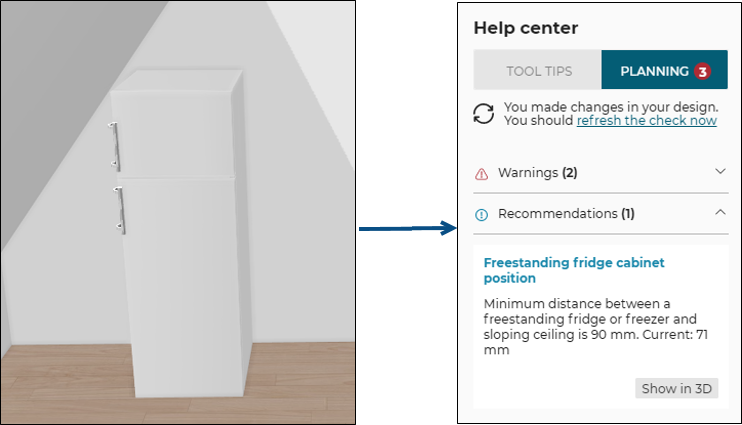
Once the user has moved the freestanding fridge away from the sloping ceiling to a distance greater than or equal to 90 mm (the overload value in this example).
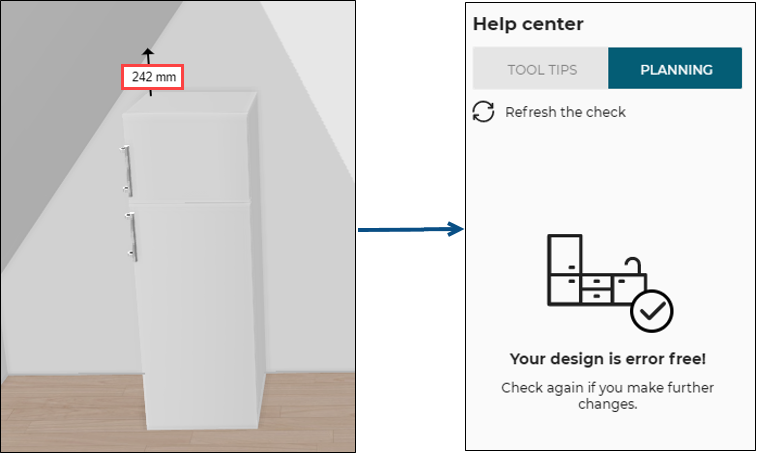
After clicking Refresh the check on the Help center, the design is now error free.
Case 5 – Check with cooktop
The distance between the cooktop and the sloping ceiling is less than the minimum distance, the rule is triggered and informs the user to change the position of the cabinet.

Once the user has moved the cooktop away from the sloping ceiling to a distance greater than or equal to 550 mm (the overload value in this example).
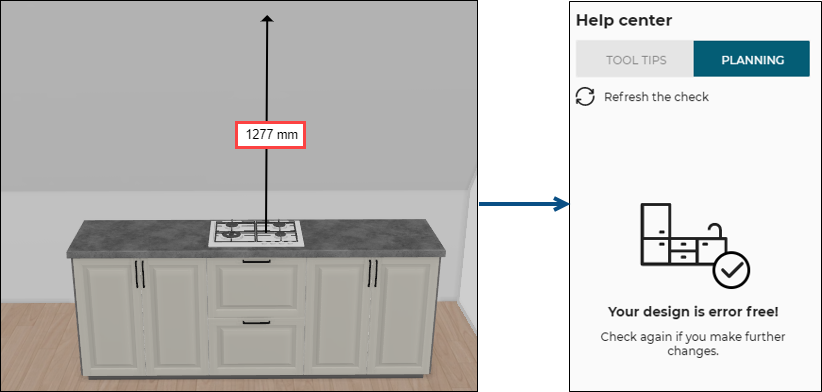
After clicking Refresh the check on the Help center, the design is now error free.
Case 6 – Check with wall panel
The distance between the wall panel and the sloping ceiling is less than the minimum distance, the rule is triggered and informs the user to change the position of the cabinet.

Once the user has moved the wall panel away from the sloping ceiling to a distance greater than or equal to 10 mm (the overload value in this example).

After clicking Refresh the check on the Help center, the design is now error free.
Case 7 – Check with high cabinet with top light
The distance between the high cabinet with top light and the sloping ceiling is less than the minimum distance, the rule is triggered and informs the user to change the position of the high cabinet with top light.
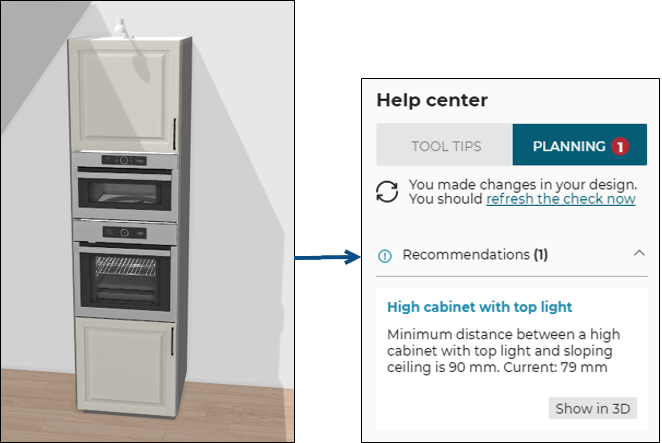
Once the user has moved the cabinet away from the sloping ceiling to a distance greater than or equal to 90 mm (the overload chosen value in this example).

After clicking Refresh the check on the Help center, the design is now error free.
Case 8 – Check with wall cabinet with top light
The distance between the wall cabinet with top light and the sloping ceiling is less than the minimum distance, the rule is triggered and informs the user to change the position of the cabinet.
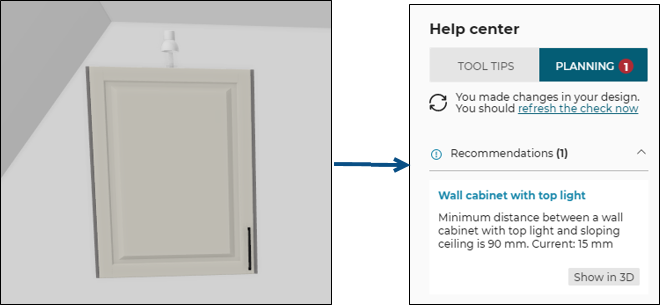
Once the user has moved the cabinet away from the sloping ceiling to a distance greater than or equal to 90 mm (the overload value in this example).
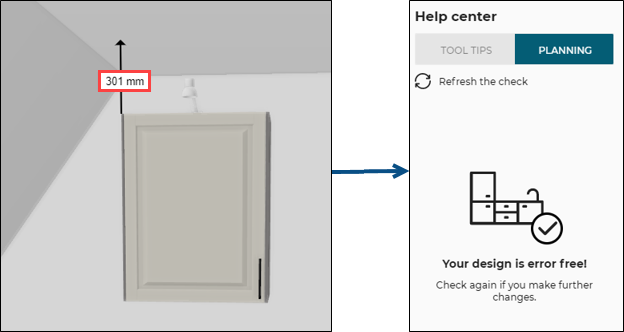
After clicking Refresh the check on the Help center, the design is now error free.
Case 9 – Check with half height cabinet
The distance between the half height cabinet and the sloping ceiling is less than the minimum distance, the rule is triggered and informs the user to change the position of the cabinet.

Once the user has moved the cabinet away from the sloping ceiling to a distance greater than or equal to 90 mm (the overload value in this example).
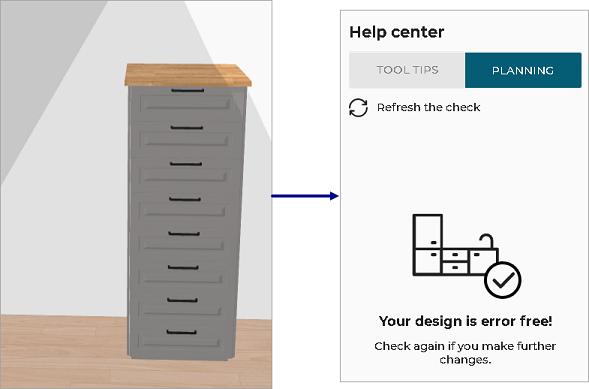
After clicking Refresh the check on the Help center, the design is now error free.