Furniture Intersecting

FurnitureIntersectRule
Collision between two cabinets.
Notification level: ⚠
| Key | Value |
|---|---|
| ID | FurnitureIntersectRule |
| Translation key | furnitureIntersect_rule_title furnitureIntersect_rule_error_message |
Behavior
This rule checks the intersection of a cabinet with another cabinet in order to avoid a collision and to prevent the user from planning a dangerous kitchen.
Trigger Conditions
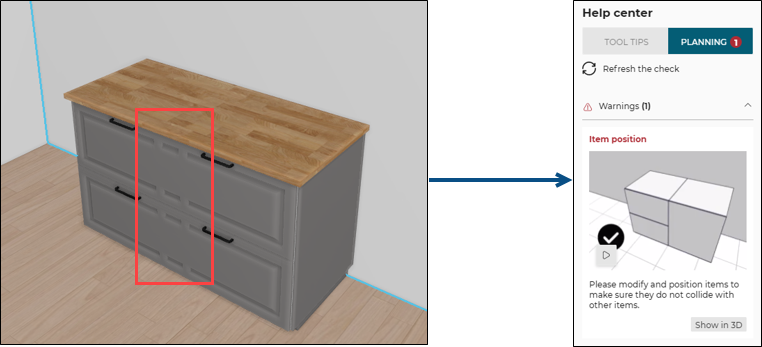
It is triggered if a cabinet collides with another cabinet. The application warns the user to modify the position of the cabinets.
Overloads Parameter
| Key name | Type | Default value | Description |
|---|---|---|---|
tolerance | number | 0.5 | This parameter defines the collision tolerance. By default is is 0.5 mm, so if the collision is between 0 and 0.5 mm, the rule doesn't trigger. Optional. |
Illustration
A cabinet is colliding with another cabinet, the business rule is triggered and informs the user to change the position of the cabinet.
A warning is displayed to the user and an animation guides her/him to make the necessary changes.
Once the user has moved one of the cabinets.
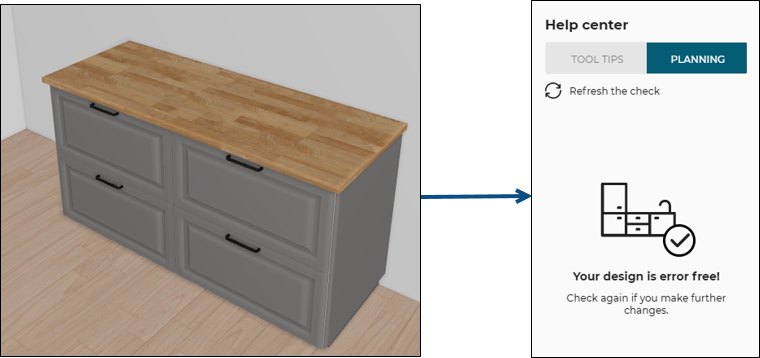
After clicking Refresh the check on the Help center, the design is now error free.