WallPanel and Gas-Hob Distance

WallPanelToGasHobDistance
Distance between gas hob and wall panel.
Notification level: ℹ
| Key | Value |
|---|---|
| ID | WallPanelToGasHobDistance |
| Translation key | wallpanel_gas_hob_dis_rule_title wallpanel_gas_hob_dis_rule_error_message |
Behavior
This rule checks if a gas hob is placed in front of a wall panel, in order to prevent the user from planning a dangerous kitchen.
Trigger Conditions
If a gas hob is detected in front of the current wall panel configuration, the rule is triggered and the application recommends change this hob or modify the configuration of the wall panel.
Affected Products
The gas hob product must have a closed tag Cooktops as well as an option with the ID energyType and the value gas.

Illustration
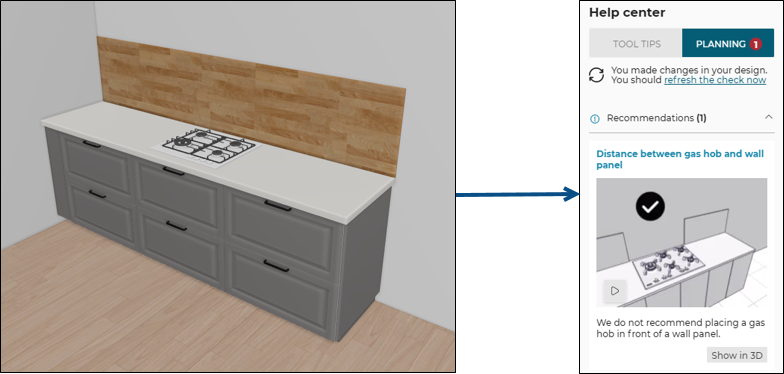
A gas hob is placed in front of the wall panel, the rule is triggered and informs the user to change the configuration of the wall panel.
An animation is displayed to guide the user through the changes.
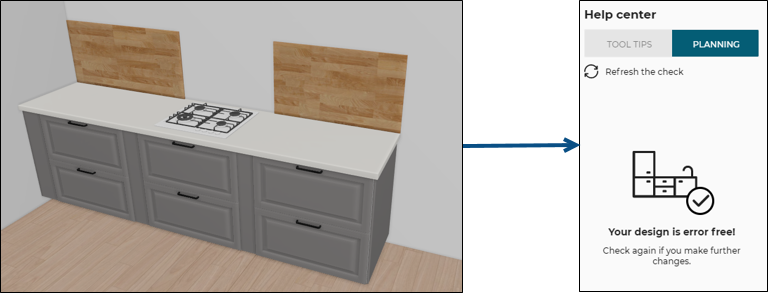
Once the user has changed the configuration of the wall panel and delete it in front of the gas hob (the overload value in this example) the design is error free.