On Demand - Product Replacement

ProductsReplacementRule
Notification level: Not applicable
| Key | Value |
|---|---|
| ID | ProductsReplacementRule |
| Translation key | Overload parameter "label" |
Behavior
This business rule is only available through the Kitchen Expert Suite offer.
The objective of this rule is to replace directly and dynamically the products available in the project by another type of products. These replacements have to be set directly in the overload parameters of the business rule.
Example: The retailers want to replace the base cabinets added in the project by another type of base cabinets like with the type "X".
Trigger Conditions
This business rule is triggered when the user clicks on the link "On demand rules" present at the botton of the Help Center feature.
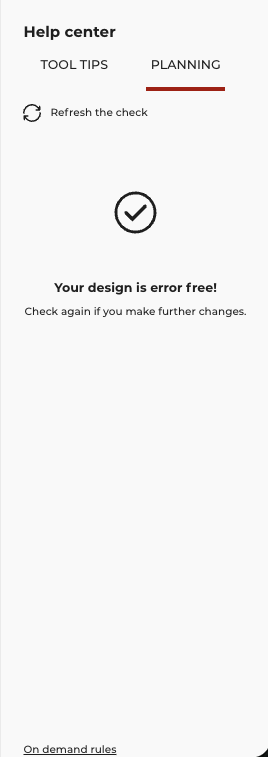
A popin in then displayed and the user can decide to active the rule or not.
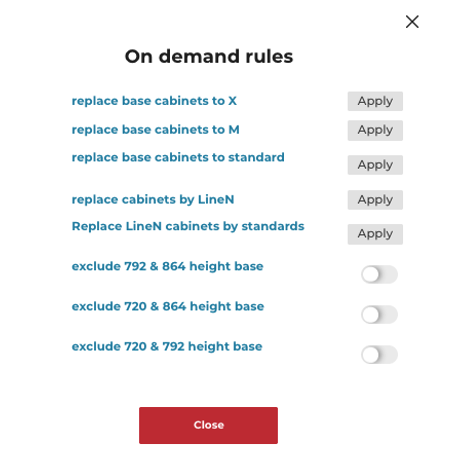
If the user clicks on "Apply" button, the rule is activated. If we take the example shown in the image above by clicking on the first rule "replace base cabinets to X", the rule is applied and only the candidate base cabinets will be replaced by the new ones i.e. the type "X".
Overload Parameter
The overload is formatted as a JSON object, in which each property is a rule that defines the mapping between the parameters.
| Key name | Type | Default value | Description |
|---|---|---|---|
label | object | – | Mandatory Object containing translations depending on the locale definition like "en-GB", "fr-FR". |
replacements | array | – | Mandatory. Define the mode, the types, the target and the current values to apply. |
For example:
In more details, the applicative rule will start by looking the mode set in the "mode" parameter. There are three different modes available:
idReplaceSuffixwhich means that we will check and replace suffix of the product ID.idReplacePrefixwhich means that we will check and replace prefix of the product ID.explicitwhich means that we will not replace prefix and suffix of the product ID.
The types parameter defines the list of the ClosedTags IDs corresponding to the products we would like to replace.
In the example below, we are checking all the type of base cabinets like "BaseCabinets" (22), "Dishwashers" (235), "OvenCabinets" (267), "UnderSinkCabinets" (269) and "CornerCabinets" (271).
The target parameter defines the value we would like to apply for the product replacement. In the example below, we would like to replace all the base cabinets by the base cabinets with the type "X". The prefix or the suffix can then be or "X-"' "-X".
The current parameter corresponds to the type of the products we are checking. In the example below, we are checking the product with the suffix "-M" and woth no suffix.
{
    "label": {
        "en-GB": "Replace base cabinets to X",
        "fr-FR": "Remplacement des meubles bas par des X"
    },
    "replacements": [
        {
            "mode": "idReplaceSuffix",
            "types": [
                22,
                235,
                267,
                269,
                271
            ],
            "target": "-X",
            "current": [
                "",
                "-M"
            ]
        }
    ]
}