Eco Fee Widget
Objective
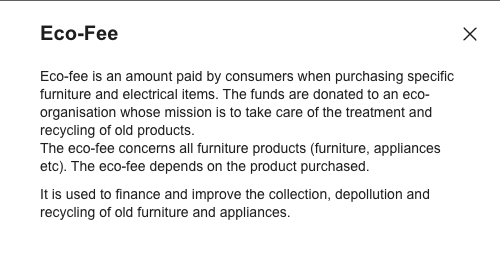
Eco Fee widget enables the user to view the Eco Fee message of the current project.
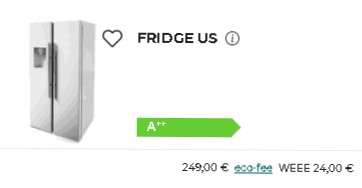
The Eco Fee message is displayed, when the user clicks on the hyperlink which is mention below the specific
furniture.
Widget Overview
Access
Users can have access to Eco Fee from Kitchen Retailer Application and Bryo Home Website.
From Kitchen Retailer Application
Access from Summary Step
Context
Like other default widgets, Eco Fee should be embedded in the application as an iframe, the communication between the application and default widget should be established on iframe messages. To have an overview of the subject, please refer to
window.postMessage() 🔗.
Every Message published or subscribed by the Eco Fee default widget should respect the following format:
| Key | Type | Description |
|---|---|---|
| event | String | Name of the event, which is used as a unique identifier |
| content | Object | Content of the event, which brings arguments helps to event handling |
Example
{
  "event": "event name",
  "content": {
    "key": "value for key"
  }
}
Overview of the Synchronization Process
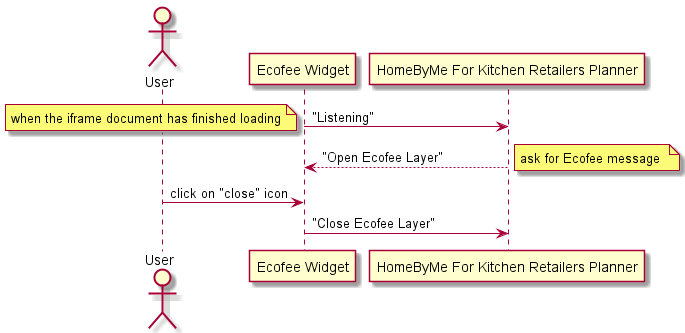
The following sequence diagram explains possible data synchronization between the application and the EcoFee default widget.
Published Events (Output events)
Published events are those events that go from default widget to application.
"Listening"
Context
When the document and all sub-resources have finished loading, send the "Listening" event to inform the application (parent window) that it is ready to listen to parent window messages. This event must be sent once and only once.
Message Format
| Key | Type | Value/Template | Description |
|---|---|---|---|
| event | String | "Listening" | - |
Message Example
{
    "event": "Listening",
}
"CloseEcoFee"
Context
When the user clicks on the "close" icon on the EcoFee default widget, send the "CloseEcoFee" event to inform the application that the default widget has been destroyed.
Message Format
| Key | Type | Value/Template | Description |
|---|---|---|---|
| event | String | "CloseEcoFee" | - |
Message Example
{
  "event": "CloseEcoFee"
}
Subscribed Events (Input events)
Subscribed events are those events that go from the application to the default widget.
"OpenEcoFee"
Context
When the default widget has finished being loaded, the application is send this event to the EcoFee default widget asking for the media list of the project.
Message Format
| Key | Type | Value/Template | Description |
|---|---|---|---|
| event | String | "OpenEcoFee" | |
| content | Object | title:String description:String translation:Object language:String namespace: String | - title: ecoFee - description:Eco-fee is an amount paid by consumers when purchasing specific furniture and electrical items. The funds are donated to an eco-organisation whose mission is to take care of the treatment and recycling of old products. The eco-fee concerns all furniture products (furniture, appliances, etc). The eco-fee depends on the product purchased. It is used to finance and improve the collection, depollution, and recycling of old furniture and appliances.- translation: Mapping of translations, with which to override the default one in the widget - language: locale code - namespace: namespace |
Message Example
{
   "content":{
"language": "en-GB",
"namespace": "translation"
   },
"common":{
"back": "Back",
"cancel": "Cancel",
"close": "Close",
"copy_clipboard": "Copy to clipboard",
"delete": "Delete",
"delete_overlay_title": "Delete this media?",
"download": "Download",
"duplicate": "Duplicate",
"no": "No",
"ok": "Ok",
"open": "Open",
"save": "Save",
"search": "Search",
"share": "Share",
"show_more": "Show more",
"yes": "Yes"
 }
}