Decorative Leg and Decorative Plinth

FurnitureDecoLegRule
Decorative leg relating to decorative plinth.
Notification level: Not applicable
| Key | Value |
|---|---|
| ID | FurnitureDecoLegRule |
| Translation key | Not applicable |
Configuration description
1. Decorative leg types
Two families of parameters drive the look of the legs:
| Parameter | Role |
|---|---|
leftDecoLegOption / rightDecoLegOption | Defines the type of leg on the left / right of the furniture (a numeric value from 1 to 7) |
supportDecoLegOption | Activates an extra support leg, used only for corner cabinets |
leftAdditionalLegPosition / rightAdditionalLegPosition | Position of an additional decorative leg on the side (useful for very wide furniture) |
backAdditionalLegPosition, backLeftAdditionalLegPosition, backRightAdditionalLegPosition | Position of an additional decorative leg at the back |
2. The 7 leg configurations (left and right side)
X -> normal decorative leg (double X to represent the orientation of the leg)
Y -> corner decoration leg

leftDecoLegOption :
   1            2           3           4           5           6           7
XX-----+    +------+    Y------+    +------+    X------+    Y------+    XX-----+
|      |    |      |    |      |    |      |    X      |    |      |    |      |
|      |    |      |    |      |    |      |    |      |    |      |    |      |
XX-----+    XX-----+    Y------+    Y------+    Y------+    XX-----+    Y------+


rightDecoLegOption :
   1            2           3           4           5           6           7
+-----XX    +------+    +------Y    +------+    +------X    +------Y    +-----XX
|      |    |      |    |      |    |      |    |      X    |      |    |      |
|      |    |      |    |      |    |      |    |      |    |      |    |      |
+-----XX    +-----XX    +------Y    +------Y    +------Y    +-----XX    +------Y
➡️️ For more explanation about the particularities of the leg configurations for the assembly configuration, please go to the following section: Leg Configuration - Assembly 🔗.
3. Determining the leg configuration value
| Is the back hidden on this side? | Side visibility | Assigned value |
|---|---|---|
| Yes | Visible | 3 |
| Yes | NotVisible | 1 |
| Yes | PartialFrontCovered | 6 |
| Yes | PartialBackCovered | 7 |
| Yes | PartialNotCovered | 3 |
| No | Visible | 5 |
| No | NotVisible | 2 |
| No | PartialFrontCovered | 1 |
| No | PartialBackCovered | 4 |
| No | PartialNotCovered | 5 |
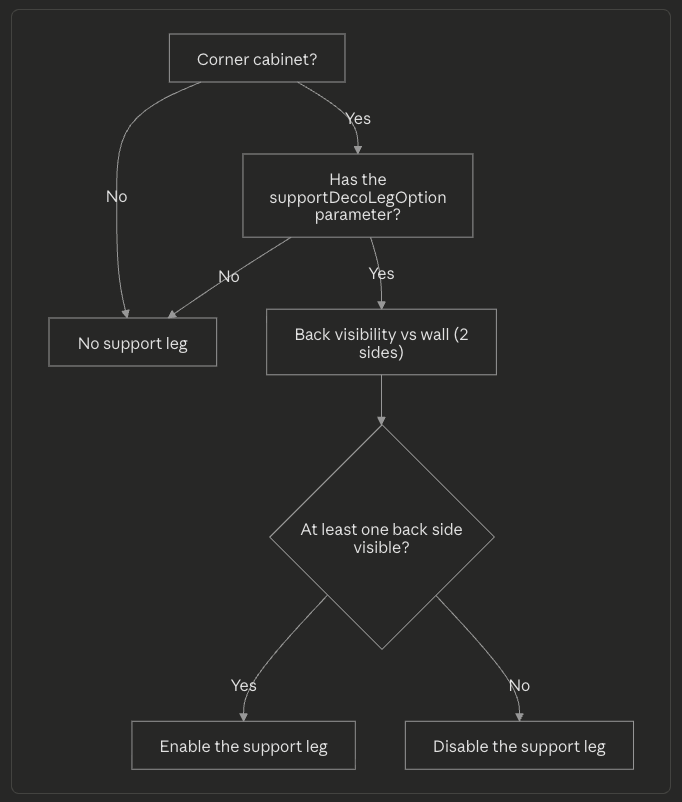
4. Specific case - Corner cabinet
For corner cabinets, an extra support leg may be needed to stabilize the structure if one of its back faces is visible (i.e. not flush against a wall). The rule:
- Checks that the cabinet can have support deco legs.
- Retrieves back visibility relative to the wall(s).
- Enables the support leg if at least one of the back sides is not fully hidden.
Behavior
This rule sets the correct decorative leg configuration when applying a related decorative plinth.
➡️️ For more information, see the decorative plinth documentation 🔗.
Trigger Conditions
Every time a decorative plinth is applied, to which decorative legs are attached, the application calculates the decorative leg configuration based on its position and type. Every time the position of the furniture changes, the rule will re-calculate the correct leg option.
Overload Parameter
This rule has no overloads. A plinth is considered to have associated decorative legs (and thus will trigger this rule) if the plinth product has the parameter regularPlinth defined on it.
Illustration
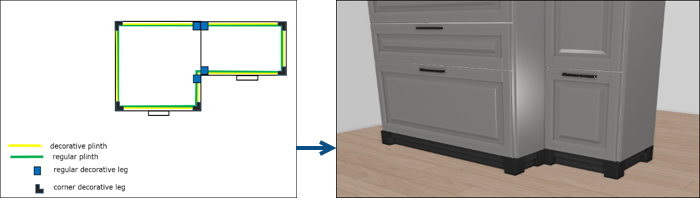
Since there are many different cases of leg configuration, the principle of the rule will be illustrated with some basic cases.
Case 1 – Combination with corner
Case 2 – Combination along a wall
