Cabinet Leg Management

FurnitureLegRule
Leg sharing between cabinets.
Notification level: Not applicable
| Key | Value |
|---|---|
| ID | FurnitureLegRule |
| Translation key | Not applicable |
Behavior
This rule automatically handles three behaviors:
- Legs sharing between cabinets placed next to each other
- Unnecessary back legs removal
- Support leg management for corner cabinets
📌 It is always the cabinet on the right that shares its legs. This means that when two cabinets share their legs, the left cabinet loses its right legs, and the cabinet on the right "moves" its left legs to the left.
The placement of the legs in the cabinet assembly is not directly modified. This rule only manipulates the three parameters described below. The BMA can then interpret them in any way.
Trigger Conditions
This rule is applied whenever there is a need to recompute legs positioning:
- Cabinet insertion
- Cabinet deletion
- Cabinet change in position (drag & drop or position tool)
- Changing solution in step 2
During drag & drop, similar to the linears and cover panels, the legs are recomputed after the cabinet is dropped (mouse button released).
For performance reasons, only the legs of affected cabinets and their direct surroundings are recomputed.
Overload Parameter
This rule has no overloads.
Leg parameters
The cabinet legs positioning is managed through the three following product parameters.
| Key name | Type | Possible value | Description |
|---|---|---|---|
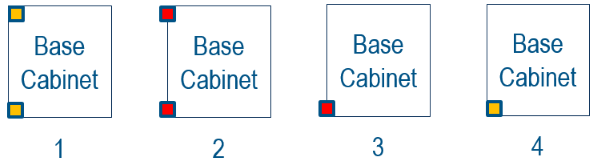
leftLegOption | integer | 1, 2, 3, 4 | 1: two left legs, not shared 2: two left legs, shared with the left neighbor 3: only the left front leg, shared with the left neighbor 4: only the left front leg, not shared. |
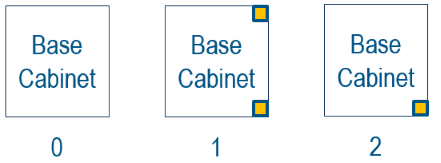
rightLegOption | integer | 0, 1, 2 | 0: no right legs (i.e. the right neighbor is sharing its left legs) 1: two right legs, not shared 2: only the right front leg, not shared. |
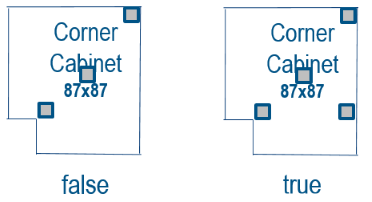
supportLegOption | boolean | true, false | true: support leg enabled false: support leg disabled. |
Those 3 parameters are independant. For example, it is possible to only use leftLegOption on a particular cabinet if the right side doesn't have any legs to share. That might be the case on a non-symmetrical corner cabinet with a built-in filler piece on the right side for example.
The
supportLegOptionparameter is only computed on corner cabinets. It is set tofalse(i.e. no need for a support leg) if the following 2 conditions are both valid:
- the 2 back sides of the corner are against a wall
- the corner cabinet has a rail enabled (see the rail documentation 🔗
If any of these conditions are not respected, the rule decides that a support leg is necessary (by setting
supportLegOptiontotrue)
Example
The images below show an example implementation of those three product parameters. It is important to note that the real 3D position of legs in the product assembly is up to the range maintainer. This applicative rule only manages the values of the three mentionned parameters on the product top-level.
Scheme for leftLegOption
Scheme for rightLegOption
Scheme for supportLegOption
Illustration
Case 1 – Legs sharing
Two cabinets with shared legs:
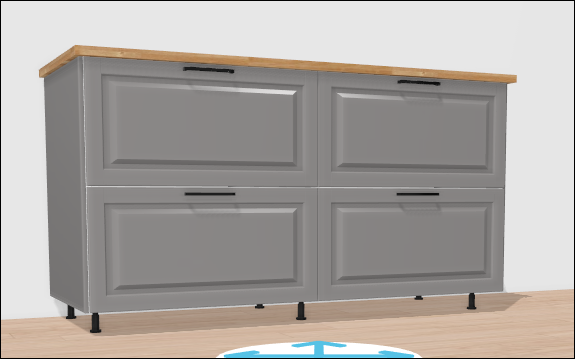
The rule will automatically share legs between two cabinets if all the following conditions are gathered:
the 2 cabinets are touching (gap smaller than 3mm) they have the same depth they both have the "leftLegOption" and "rightLegOption" with the correct list of possible values Back legs removal A cabinet with removed back-left leg:

The rule will automatically remove the back-left leg on a cabinet if one of the following situations occurs:
- It is against a wall, it has a suspension rail and its left side is covered by a wall;
- It is against a wall, it has a suspension rail and there is another cabinet on its left that has the same depth.
In the same logic, the rule will automatically remove the back-right leg on a cabinet if one of the following situations occurs:
- It is against a wall, it has a suspension rail and its right side is covered by a wall;
- It is against a wall, it has a suspension rail and there is another cabinet1 on its right that has the same depth (Freestanding appliances and deco products will not trigger this behavior).
📌 If two cabinets stand next to each other against a wall and share their legs, the shared back leg is removed if both cabinets have a suspension rail.
Case 2 – Shared legs and back leg removed
The two cabinets with shared legs + their common back leg removed:

Case 3 – Support leg for corner cabinets
The rule will automatically remove the support leg of a corner cabinet if it is placed in a wall corner and if it has suspension rails. If either of these conditions is not fulfilled, the support leg will be activated automatically.
A corner cabinet with its support leg activated (due to absence of suspension rails):
